






1. Cách kết nối VPS với windows
Hướng dẫn sử dụng Remote Desktop để truy cập VPS
Trước tiên thì bạn cần phải có đó là một chiếc VPS đã được cài đặt hệ điều hành Windows. Nếu bạn chưa có VPS Windows thì liên hệ support VPSRE.NET để được hỗ trợ mua VPS
Hoặc mua trực tiếp tại VPSRE.NET
Sau khi đã có một VPS rồi thì bạn sẽ có thông tin của một VPS được cấp gồm IP,User và pass như sau
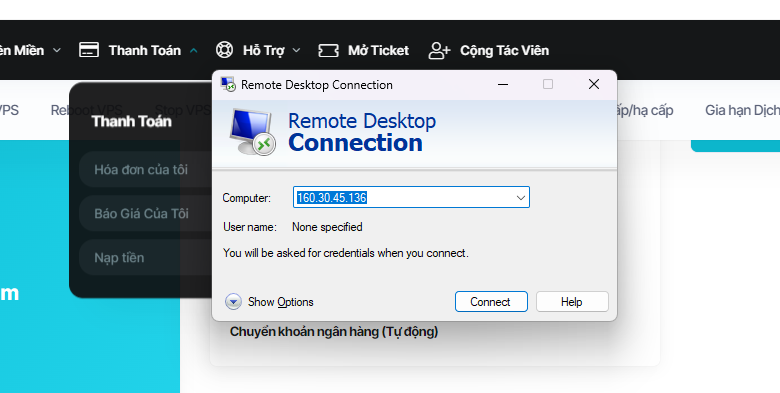
IP: 160.30.45.136
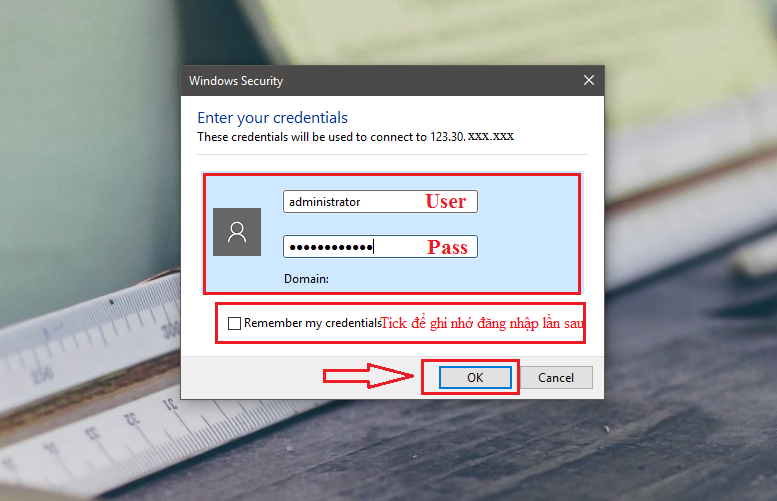
Username: Administrator
Root Password: @VPSRe!jta8IOU
Đó chính là thông tin đăng nhập để Remote Desktop, bạn lưu thông tin này tại nơi nào đó dễ nhớ nhất để những lần sau đăng nhập lại đỡ mất thời gian hoặc cũng có thể là đổi mật khẩu cho dễ nhớ.
Tiếp theo bạn thao tác theo các bước sau:
Với Win XP + Win 7 + Win 8 + Win 10 có thể dùng chung một cách sử dụng như sau
Nhấn phím Window + R > gõ mstsc > Enter

Password: @VPSRe!jta8IOU
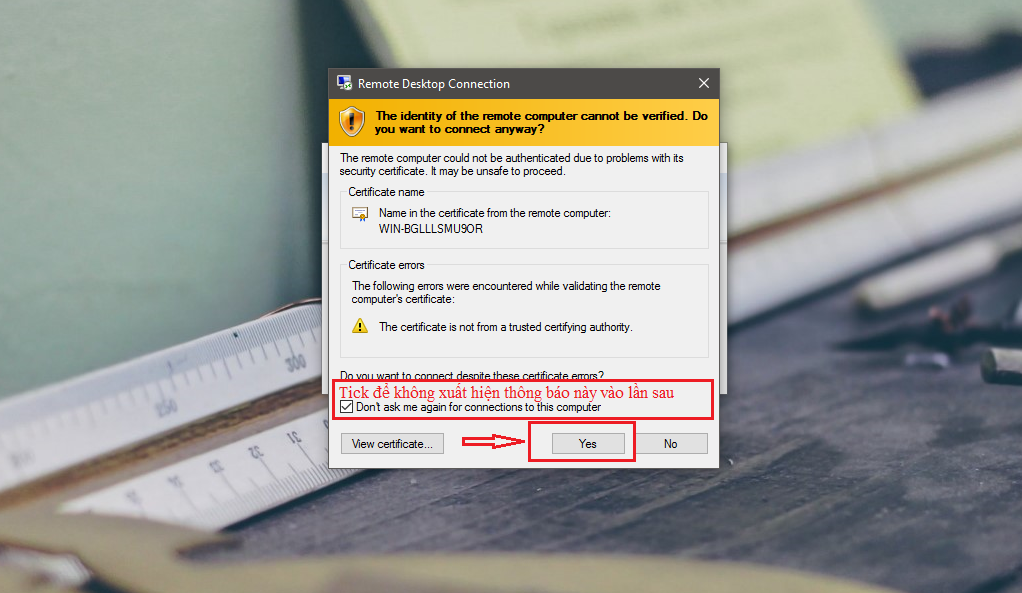
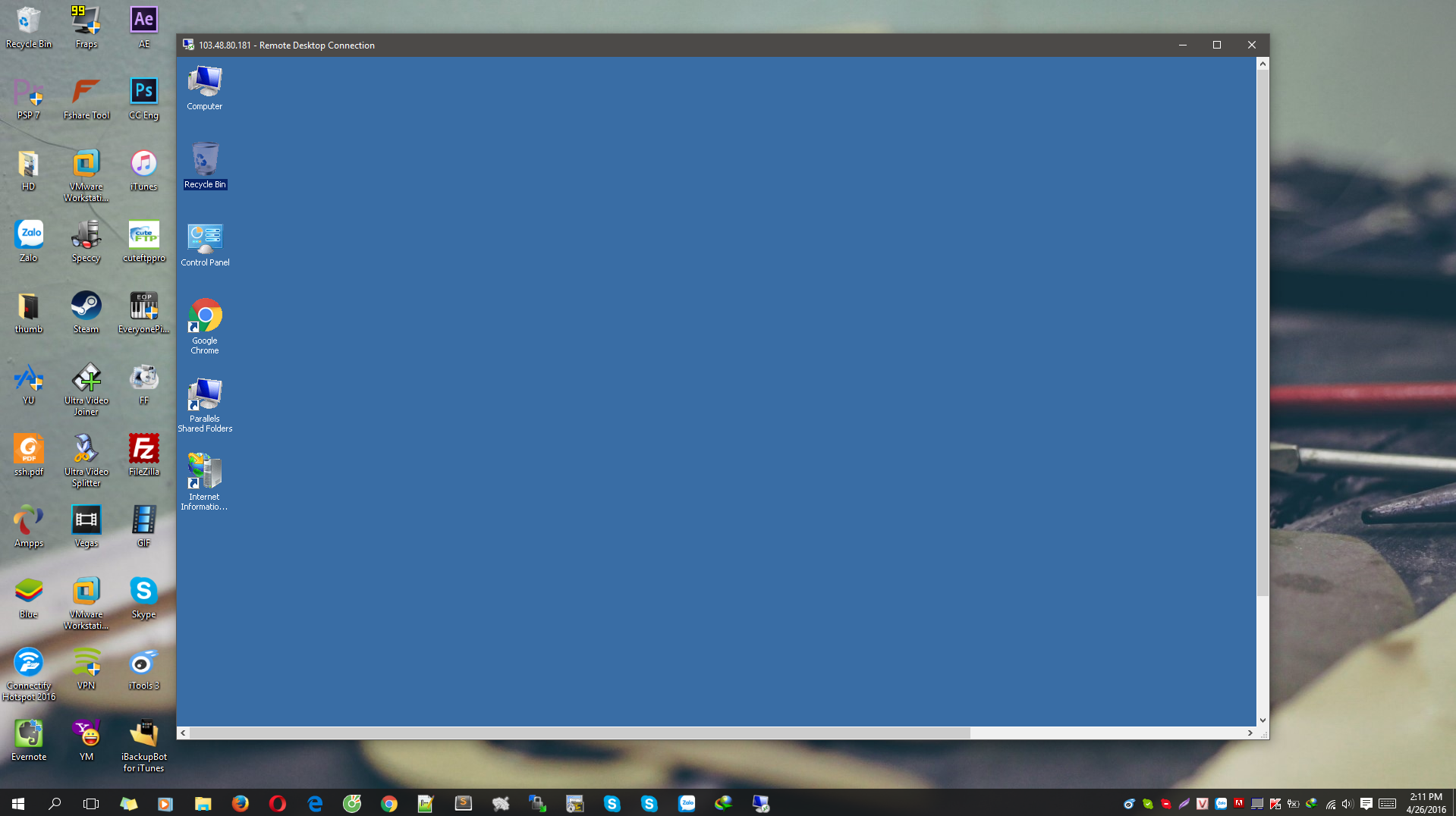
2. Kết nối từ iPhone/iPad, điện thoại Android
Để sử dụng thì bạn cần tải ứng dụng Microsoft Remote Desktop trên điện thoại Android hoặc iPhone/iPad. Dưới đây là đường link để tải ứng dụng.
Dành cho điện thoại Android: Nhấn TẠI ĐÂY.
Dành cho iPhone/iPad: Nhấn TẠI ĐÂY.
Bước 1: Mở ứng dụng Microsoft Remote Desktop trên điện thoại của bạn.
Bước 2: Chọn biểu tượng dấu cộng ở góc trên bên phải > Nhấn Desktop trong menu Add New.
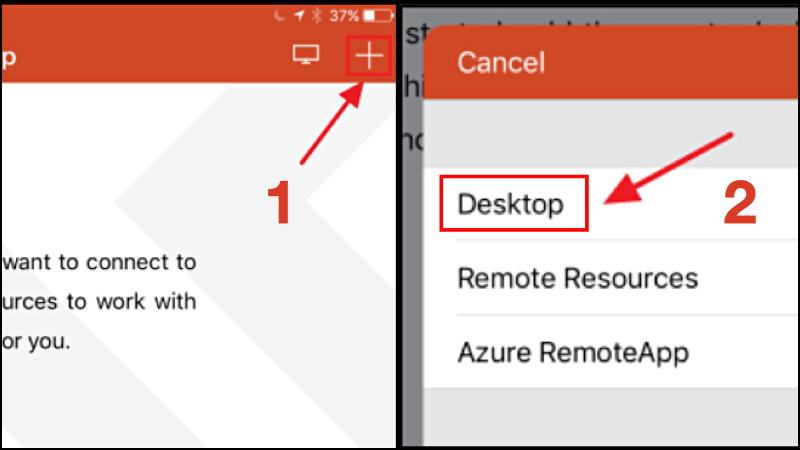
Nhấn Desktop trong menu Add New
Bước 3: Nhập địa chỉ IP vào mục PC name > ChọnDone.
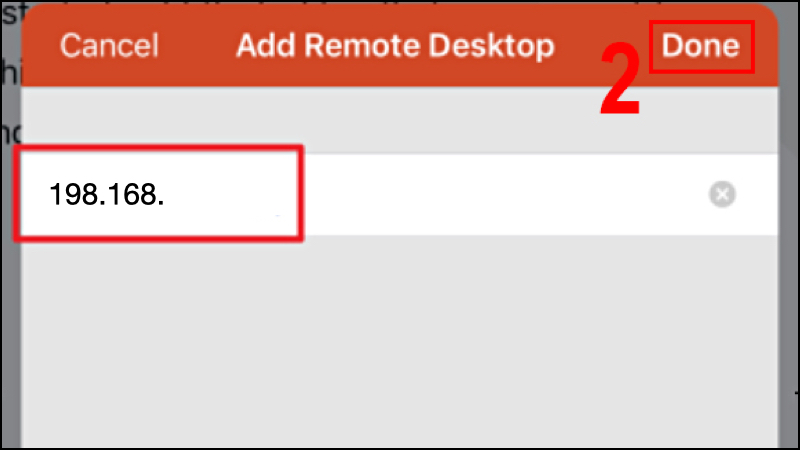
Nhập địa chỉ IP vào PC name
Bước 4: Nhập đúng tên người dùng (username) và mật khẩu (password) nếu được yêu cầu.
3. Các phím tắt trên Remote Desktop
Để sử dụng Remote Desktop dễ dàng, bạn nên sử dụng các phím tắt để. Tham khảo bảng phím tắt trên Remote Desktop dành cho máy tính Windows dưới đây.
Bạn cũng có thể thực hiện tương tự trên MacBook, tuy nhiên cần thay phím Ctrl thành Command.
| STT | Tính năng | Phím tắt |
| 1 | Chuyển máy khách Remote Desktop giữa chế độ toàn màn hình và chế độ cửa sổ | Ctrl + Alt + Pause |
| 2 | Thiết lập Remote Desktop ở chế độ toàn màn hình | Ctrl + Alt + Break |
| 3 | Chụp ảnh màn hình của cửa sổ Remote Desktop đang hoạt động | Ctrl + Alt + Minus |
| 4 | Chụp ảnh màn hình của toàn bộ Remote Desktop | Ctrl + Alt + Plus |
| 5 | Khởi động lại máy tính từ xa | Ctrl + Alt + End |
4. Cách khắc phục một số lỗi thường gặp khi sử dụng Remote Desktop
– Một số lỗi thường gặp
Trong quá trính sử dụng Remote Desktop trên Windows thì rất có thể bạn sẽ gặp một số trường hợp lỗi được để cập dưới đây:
+ Không thể kết nối với máy tính từ xa.
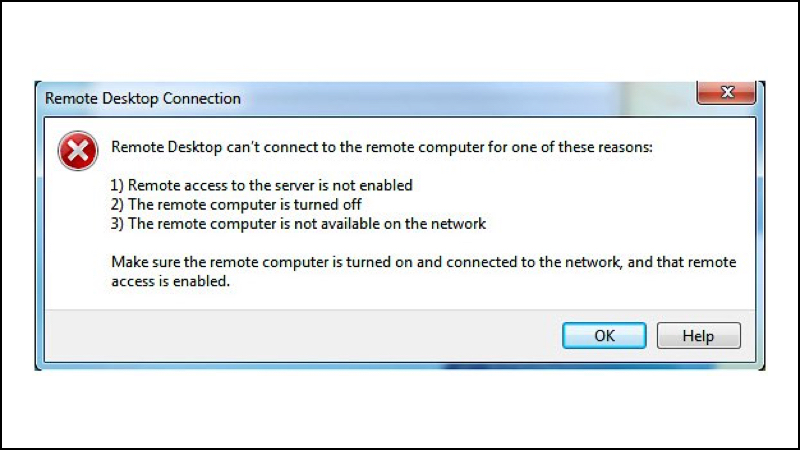
Lỗi không thể kết nối với máy tính từ xa
+ Không thể sao chép văn bản từ máy tính từ xa.
+ Tính năng sao chép văn bản không hoạt động.
+ Kích thước cửa sổ từ xa quá lớn/quá nhỏ.
+ Thông tin đăng nhập khác với lần kết nối cuối cùng.
+ Phải lưu cấu hình tùy chỉnh mỗi lần kết nối.
– Cách khắc phục
Nguyên nhân của các vấn đề trên có thể do sau khi bạn nâng cấp Windows, Remote Desktop có thể sẽ gặp lỗi do bản nâng cấp không tương thích với tính năng đang có.
Ngoài ra, các phần mềm antivirus có thể sẽ chặn tính năng Remote Desktop dẫn đến việc bạn không thể sử dụng tính năng này, tương tự với việc sử dụng Public network cũng xảy ra tình trạng tương tự.


electromagnetic water meter,small flow mass flow meter,polymer mass flow meter,LNG coriolis flow meter LNG coriolis flow meter
The tool multiplies these inputs to provide the expected payout.
odds decimal to fraction [url=http://singlebetcalculator-free.uk/odds-explained/]https://singlebetcalculator-free.uk/odds-explained/[/url]
crazy time america https://crazy-time-stats.com/
ultimi risultati crazy time https://live-crazy-time.com/
how to win at crazy time https://crazy-time-gratis.com/
crazy time casino gratis crazy time casino gratis.
Per vivere l’adrenalina del Crazy Time nei casino italiani, visita storico crazy time e scopri demo, statistiche e partite in diretta.
Anche chi e nuovo nel mondo del gioco online trova facilmente la navigazione e il divertimento all’interno del sito.
Se vuoi vivere l’emozione unica del gioco d’azzardo, non perdere l’occasione di provare ultime vincite crazy time per scoprire il miglior intrattenimento casino in Italia!
Crazy Time Slot Casino Italy e diventato uno dei casino online piu popolari. I giocatori amano Crazy Time Slot Casino in Italia soprattutto per la sua ricca selezione di slot e la navigazione semplice. Molti puntano su Crazy Time Slot Casino Italy grazie alle sue misure di sicurezza e alla serieta del servizio.
L’interfaccia utente e stata progettata per essere accessibile a tutti, anche ai principianti. Le animazioni fluide e gli effetti sonori aiutano a rendere il gioco piu emozionante e realistico. Gli utenti possono accedere facilmente dalla versione mobile senza perdere qualita ne funzionalita.
crazy time today https://crazytimeitalia-it.com/
crazy time 888 casino https://crazytimeit-italia.com/
Meu saldo tava baixo, mas o Fortune Mouse me salvou hoje de manhã. Show de bola.
Paciência paga. Entrei no Blackjack com pouco e puxei R$ 200 rapidinho.
Как E-E-A-T учитывается при Seo продвижение в Google под ключ?
Mais uma win pro histórico. Piggy Gold tá dominando.
https://erotilink-connexion.com/
Wonderful goods from you, man. I have take into account your stuff previous to and you’re simply extremely wonderful.
I actually like what you have acquired here, really
like what you are stating and the way through which you are
saying it. You’re making it enjoyable and you
still care for to keep it smart. I can’t wait to read far more from you.
This is actually a tremendous website.
从信息架构看,Cryptify Hub采用分类目录模式,将Web3、AI、加密领域的常用工具按功能分组展示。它不介入用户与目标网站之间的任何交互,也不对目标网站的内容、安全性或合规性做担保。本质上是一个中立的参考链接库。
https://jm-rencontre.net/
First of all I would like to say excellent blog!
I had a quick question which I’d like to ask
if you do not mind. I was curious to find out how you center yourself and clear your
thoughts prior to writing. I’ve had trouble clearing my thoughts in getting my ideas out there.
I truly do enjoy writing however it just seems like the first 10 to 15 minutes
are generally wasted simply just trying to figure out how to begin.
Any ideas or hints? Kudos!
O Buffalo Win tá pagando muito na virada do dia! Já fiz o PIX de R$ 500.
O multiplicador estourou no Candy Bonanza! Foi um Multiplicador 100x absurdo, coisa de mais de 10k.
Curious how you’d apply this thinking to smaller teams or solo creators. The principles make sense at scale, but do you think the approach shifts meaningfully when resources are tighter?
bitcoin poker websie bitcoin poker websie .
bitcoin poker android development bitcoin poker android development .
beste bitcoin poker sites http://www.poker-bitcoin.de .
Right now it looks like Expression Engine is the top blogging platform out there right now. (from what I’ve read) Is that what you are using on your blog?
poker sites accepting bitcoin https://poker-bitcoin-deutschland.de/ .
using bitcoin for online poker https://onlinepoker-bitcoin.de/ .
leovegas monopoly live https://monopoly-casino-in.com/
bitcoin or debit or paypal for online poker http://www.bitcoin-poker-deutschland.de/ .
best online poker bitcoin onlinepokerbitcoin.de .
Currently it appears like WordPress is the top blogging platform out there right now. (from what I’ve read) Is that what you’re using on your blog?
A tranquilidade de jogar Lucky Neko com gestão. Saí com milzão.
crazy time demo gratis crazy time demo gratis .
crazy time fake http://www.crazy-timeitalia.com/ .
SEO после редизайна сайта — как не потерять накопленные позиции?
888slot poker có hệ thống backup dữ liệu 3 lớp – đảm bảo không bao giờ mất thông tin người chơi, ngay cả trong trường hợp sự cố kỹ thuật nghiêm trọng. TONY06-11
Hi there, You have done a fantastic job. I will definitely digg it and in my opinion recommend to my friends. I am confident they will be benefited from this web site.
Hey there, You’ve done an excellent job. I’ll definitely digg it and for my part recommend to my friends. I’m confident they’ll be benefited from this site.
Hello there, You have performed an excellent job. I will definitely digg it and for my part recommend to my friends. I am confident they’ll be benefited from this web site.